> ## Documentation Index
> Fetch the complete documentation index at: https://docs-staging-feat-docs-5607-tenant-acl.mintlify.site/llms.txt
> Use this file to discover all available pages before exploring further.

# ユースケース：Formsを使用して更新ポリシーフォームを構成する

> Forms for Actionsを使用して更新ポリシーフォームを構成する

<Card title="始める前に">
  1. 以下のスコープを有効にして、[マシンツーマシンアプリケーション](https://auth0.com/docs/get-started/auth0-overview/create-applications/machine-to-machine-apps)を作成します。

  * `read:users`
  * `update:users`
  * `create:users`
  * `read:users_app_metadata`
  * `update:users_app_metadata`
  * `create:users_app_metadata`

  2. マシンツーマシンアプリケーションの資格情報を使って[Vault接続](/docs/ja-jp/customize/forms/vault)を追加します。
</Card>

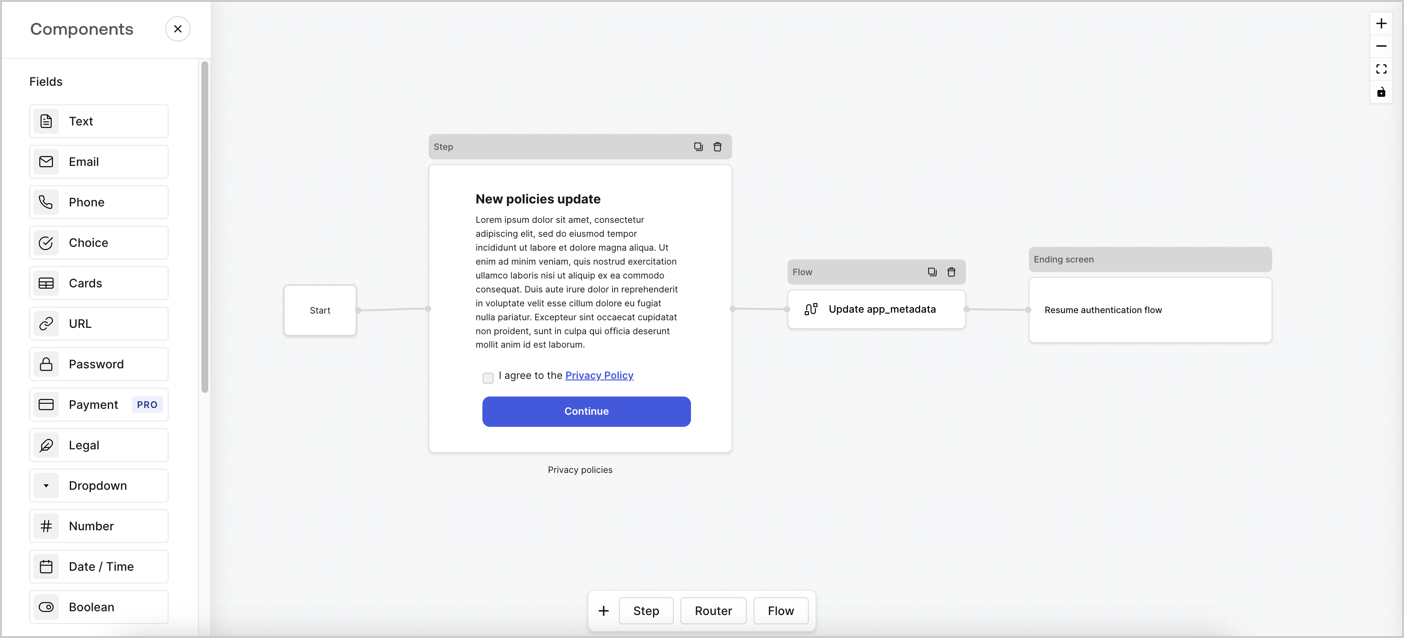
Forms for Actionsは、カスタムプライバシーポリシーフローを作成し、`app_metadata`オブジェクトの下に同意を保存できるようにします。
<Frame>
  <img src="https://mintcdn.com/docs-staging-feat-docs-5607-tenant-acl/nLkK07PAzzdVw1Rz/docs/images/ja-jp/cdy7uua7fh8z/6i68dMvHDTijfRmSgN1x8Q/ad900e7d4c0fb34645921435472b8684/privavy-policy-form.png?fit=max&auto=format&n=nLkK07PAzzdVw1Rz&q=85&s=7f7a8440048e748ce4593cd2499e41b2" alt="Dashboard > Actions > Forms > Privacy policy use case" data-og-width="1404" width="1404" data-og-height="638" height="638" data-path="docs/images/ja-jp/cdy7uua7fh8z/6i68dMvHDTijfRmSgN1x8Q/ad900e7d4c0fb34645921435472b8684/privavy-policy-form.png" data-optimize="true" data-opv="3" srcset="https://mintcdn.com/docs-staging-feat-docs-5607-tenant-acl/nLkK07PAzzdVw1Rz/docs/images/ja-jp/cdy7uua7fh8z/6i68dMvHDTijfRmSgN1x8Q/ad900e7d4c0fb34645921435472b8684/privavy-policy-form.png?w=280&fit=max&auto=format&n=nLkK07PAzzdVw1Rz&q=85&s=9ce982c42abfe996e0a21b8b0516b4f2 280w, https://mintcdn.com/docs-staging-feat-docs-5607-tenant-acl/nLkK07PAzzdVw1Rz/docs/images/ja-jp/cdy7uua7fh8z/6i68dMvHDTijfRmSgN1x8Q/ad900e7d4c0fb34645921435472b8684/privavy-policy-form.png?w=560&fit=max&auto=format&n=nLkK07PAzzdVw1Rz&q=85&s=9d76ad4fc5eb945d0dc7f31f18ac733a 560w, https://mintcdn.com/docs-staging-feat-docs-5607-tenant-acl/nLkK07PAzzdVw1Rz/docs/images/ja-jp/cdy7uua7fh8z/6i68dMvHDTijfRmSgN1x8Q/ad900e7d4c0fb34645921435472b8684/privavy-policy-form.png?w=840&fit=max&auto=format&n=nLkK07PAzzdVw1Rz&q=85&s=0d01ea322d9504e8ff94663765427999 840w, https://mintcdn.com/docs-staging-feat-docs-5607-tenant-acl/nLkK07PAzzdVw1Rz/docs/images/ja-jp/cdy7uua7fh8z/6i68dMvHDTijfRmSgN1x8Q/ad900e7d4c0fb34645921435472b8684/privavy-policy-form.png?w=1100&fit=max&auto=format&n=nLkK07PAzzdVw1Rz&q=85&s=499438b0b9e879782c20e8ec18fc6fce 1100w, https://mintcdn.com/docs-staging-feat-docs-5607-tenant-acl/nLkK07PAzzdVw1Rz/docs/images/ja-jp/cdy7uua7fh8z/6i68dMvHDTijfRmSgN1x8Q/ad900e7d4c0fb34645921435472b8684/privavy-policy-form.png?w=1650&fit=max&auto=format&n=nLkK07PAzzdVw1Rz&q=85&s=47a7f34b69165f263664f8f987ea1671 1650w, https://mintcdn.com/docs-staging-feat-docs-5607-tenant-acl/nLkK07PAzzdVw1Rz/docs/images/ja-jp/cdy7uua7fh8z/6i68dMvHDTijfRmSgN1x8Q/ad900e7d4c0fb34645921435472b8684/privavy-policy-form.png?w=2500&fit=max&auto=format&n=nLkK07PAzzdVw1Rz&q=85&s=a86c1847fa56cf31fa375fe980d166f3 2500w" />
</Frame>

以下のセクションでは、ノードとフローを使用して更新ポリシーフォームを作成する方法と、フォームを[ログイン後](/docs/ja-jp/customize/actions/explore-triggers/signup-and-login-triggers/login-trigger)のアクションに追加する手順について説明します。

## フォームをゼロから作成する

情報を収集するためのフォームを作成するには、次の手順に従ってください。

1. **［Auth0 Dashboard］>［Actions（アクション）］>［Forms（フォーム）］** の順に選択して、フォームエディターを開きます。
2. **［Create Form（フォームを作成）］** > **［Start from scratch（初めから作成する）］** の順に選択します。

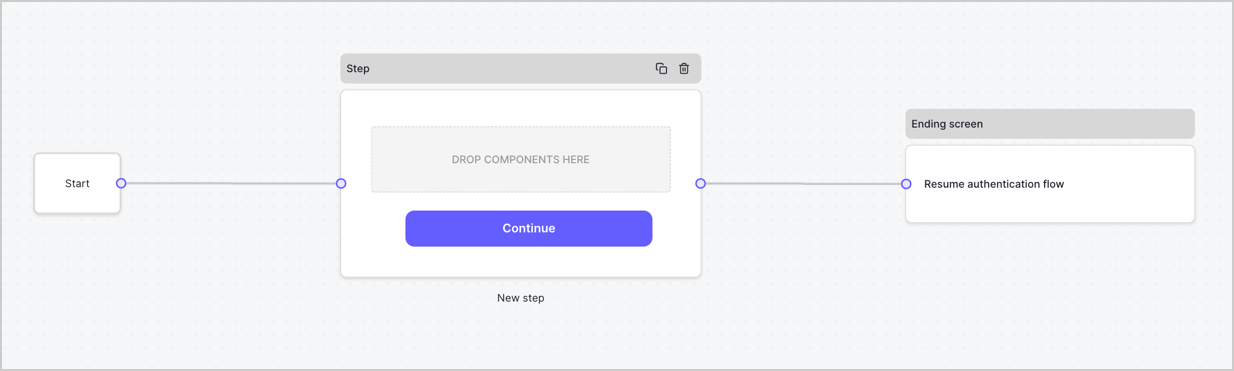
特に設定を変更しない限り、新しいフォームには開始ノード、ステップノード、および終了スクリーンノードが含まれます。
<Frame>
  <img src="https://mintcdn.com/docs-staging-feat-docs-5607-tenant-acl/IhAGGiOdZjC9Mpg4/docs/images/ja-jp/cdy7uua7fh8z/2TZ9jSjgEcARFpULI6hz4R/a4319a1bd482f2ee5cc23100fdb2f42c/New-form-Forms-for-action-use-case.png?fit=max&auto=format&n=IhAGGiOdZjC9Mpg4&q=85&s=f23a2c448302858f9a57faf62e632ac0" alt="Dashboard > Forms > Use Cases > Form" data-og-width="1234" width="1234" data-og-height="371" height="371" data-path="docs/images/ja-jp/cdy7uua7fh8z/2TZ9jSjgEcARFpULI6hz4R/a4319a1bd482f2ee5cc23100fdb2f42c/New-form-Forms-for-action-use-case.png" data-optimize="true" data-opv="3" srcset="https://mintcdn.com/docs-staging-feat-docs-5607-tenant-acl/IhAGGiOdZjC9Mpg4/docs/images/ja-jp/cdy7uua7fh8z/2TZ9jSjgEcARFpULI6hz4R/a4319a1bd482f2ee5cc23100fdb2f42c/New-form-Forms-for-action-use-case.png?w=280&fit=max&auto=format&n=IhAGGiOdZjC9Mpg4&q=85&s=14c423f07239c09d80e90d3f9c2f155a 280w, https://mintcdn.com/docs-staging-feat-docs-5607-tenant-acl/IhAGGiOdZjC9Mpg4/docs/images/ja-jp/cdy7uua7fh8z/2TZ9jSjgEcARFpULI6hz4R/a4319a1bd482f2ee5cc23100fdb2f42c/New-form-Forms-for-action-use-case.png?w=560&fit=max&auto=format&n=IhAGGiOdZjC9Mpg4&q=85&s=47e098d3d1e67ec9c838d9e37f11bee4 560w, https://mintcdn.com/docs-staging-feat-docs-5607-tenant-acl/IhAGGiOdZjC9Mpg4/docs/images/ja-jp/cdy7uua7fh8z/2TZ9jSjgEcARFpULI6hz4R/a4319a1bd482f2ee5cc23100fdb2f42c/New-form-Forms-for-action-use-case.png?w=840&fit=max&auto=format&n=IhAGGiOdZjC9Mpg4&q=85&s=d6847b374c89b5daadf5616bf4863d2d 840w, https://mintcdn.com/docs-staging-feat-docs-5607-tenant-acl/IhAGGiOdZjC9Mpg4/docs/images/ja-jp/cdy7uua7fh8z/2TZ9jSjgEcARFpULI6hz4R/a4319a1bd482f2ee5cc23100fdb2f42c/New-form-Forms-for-action-use-case.png?w=1100&fit=max&auto=format&n=IhAGGiOdZjC9Mpg4&q=85&s=911a95bd37c5f10fcad2cccbe4399091 1100w, https://mintcdn.com/docs-staging-feat-docs-5607-tenant-acl/IhAGGiOdZjC9Mpg4/docs/images/ja-jp/cdy7uua7fh8z/2TZ9jSjgEcARFpULI6hz4R/a4319a1bd482f2ee5cc23100fdb2f42c/New-form-Forms-for-action-use-case.png?w=1650&fit=max&auto=format&n=IhAGGiOdZjC9Mpg4&q=85&s=c868ea7380c2491349e59afb3ac08fc3 1650w, https://mintcdn.com/docs-staging-feat-docs-5607-tenant-acl/IhAGGiOdZjC9Mpg4/docs/images/ja-jp/cdy7uua7fh8z/2TZ9jSjgEcARFpULI6hz4R/a4319a1bd482f2ee5cc23100fdb2f42c/New-form-Forms-for-action-use-case.png?w=2500&fit=max&auto=format&n=IhAGGiOdZjC9Mpg4&q=85&s=defc8b2092bcc84c74b6232c4935536a 2500w" />
</Frame>

### ステップノードを構成する

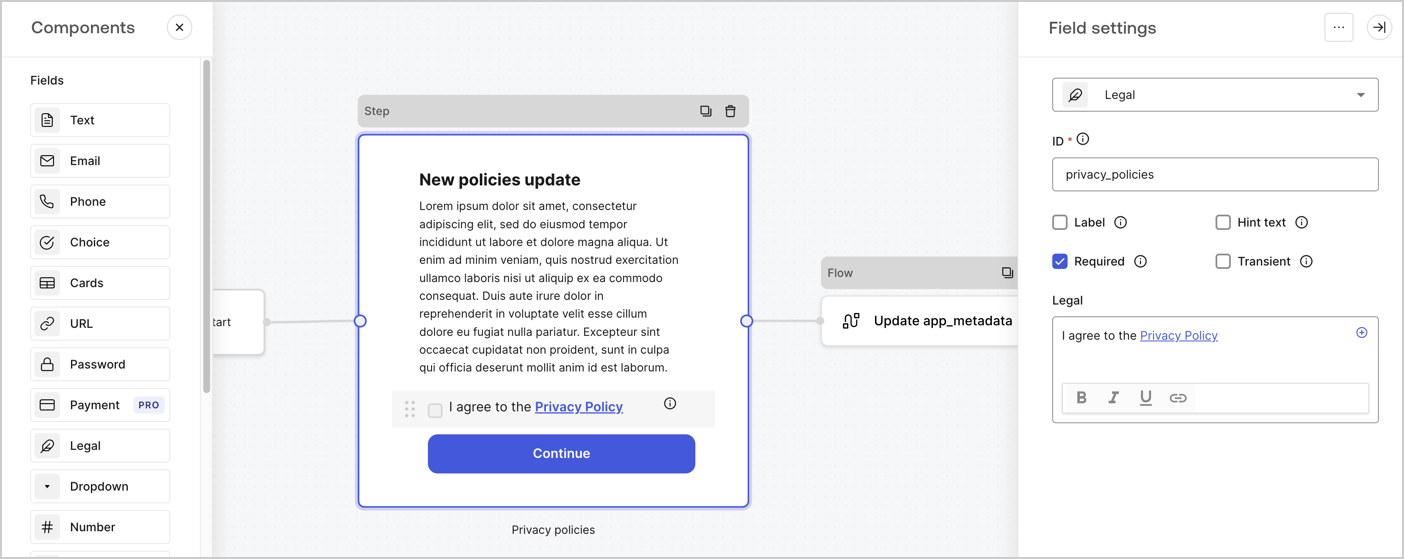
ステップノードは、ユーザーに表示されるグラフィカルインターフェースです。次の手順に従って、ステップノードに[フィールド](/docs/ja-jp/customize/forms/nodes-and-components)を追加し、新しい同意の値を収集します。

1. **［Components menu（コンポーネントメニュー）］** から **［Rich text（リッチテキスト）］** フィールドを **Step（ステップ）** ノードにドラッグします。

   * **Rich text（リッチテキスト）** ：プライバシーポリシー更新の説明を入力します。
   * **［Save（保存）］** を選択します。
2. **［Legal（法務）］** フィールドを **Step（ステップ）** ノードにドラッグします。

   * **Id** ：`privacy_policies`を入力します。
   * **Required（必要）** ：チェックボックスを有効にします。
   * **Legal（法的文）** ：「`I agree to the Privacy Policy`（プライバシーポリシーに同意します）」と入力します。
   * **［Save（保存）］** を選択します。
3. **［Publish（公開）］** を選択して保存します。

<Frame>
  <img src="https://mintcdn.com/docs-staging-feat-docs-5607-tenant-acl/vw6d32Rpk-ddo5O1/docs/images/ja-jp/cdy7uua7fh8z/59zFFjQjAnjogkc2QGIqqJ/0ad66b1b636544122aa4e65968b76c2c/privacy-policy-step-node.png?fit=max&auto=format&n=vw6d32Rpk-ddo5O1&q=85&s=3d6b46ca7c18b35e7055788975ac0315" alt="Dashboard > Actions > Forms > Use case privacy policy step node" data-og-width="1404" width="1404" data-og-height="559" height="559" data-path="docs/images/ja-jp/cdy7uua7fh8z/59zFFjQjAnjogkc2QGIqqJ/0ad66b1b636544122aa4e65968b76c2c/privacy-policy-step-node.png" data-optimize="true" data-opv="3" srcset="https://mintcdn.com/docs-staging-feat-docs-5607-tenant-acl/vw6d32Rpk-ddo5O1/docs/images/ja-jp/cdy7uua7fh8z/59zFFjQjAnjogkc2QGIqqJ/0ad66b1b636544122aa4e65968b76c2c/privacy-policy-step-node.png?w=280&fit=max&auto=format&n=vw6d32Rpk-ddo5O1&q=85&s=e50dc66ab74b447f2895d55b55368032 280w, https://mintcdn.com/docs-staging-feat-docs-5607-tenant-acl/vw6d32Rpk-ddo5O1/docs/images/ja-jp/cdy7uua7fh8z/59zFFjQjAnjogkc2QGIqqJ/0ad66b1b636544122aa4e65968b76c2c/privacy-policy-step-node.png?w=560&fit=max&auto=format&n=vw6d32Rpk-ddo5O1&q=85&s=1c4c14582762e3bfb3767aae795d11a1 560w, https://mintcdn.com/docs-staging-feat-docs-5607-tenant-acl/vw6d32Rpk-ddo5O1/docs/images/ja-jp/cdy7uua7fh8z/59zFFjQjAnjogkc2QGIqqJ/0ad66b1b636544122aa4e65968b76c2c/privacy-policy-step-node.png?w=840&fit=max&auto=format&n=vw6d32Rpk-ddo5O1&q=85&s=d3d29241d40f436193a71935e9a2b066 840w, https://mintcdn.com/docs-staging-feat-docs-5607-tenant-acl/vw6d32Rpk-ddo5O1/docs/images/ja-jp/cdy7uua7fh8z/59zFFjQjAnjogkc2QGIqqJ/0ad66b1b636544122aa4e65968b76c2c/privacy-policy-step-node.png?w=1100&fit=max&auto=format&n=vw6d32Rpk-ddo5O1&q=85&s=7598d15cac5ce23aa09d56d33645e4f9 1100w, https://mintcdn.com/docs-staging-feat-docs-5607-tenant-acl/vw6d32Rpk-ddo5O1/docs/images/ja-jp/cdy7uua7fh8z/59zFFjQjAnjogkc2QGIqqJ/0ad66b1b636544122aa4e65968b76c2c/privacy-policy-step-node.png?w=1650&fit=max&auto=format&n=vw6d32Rpk-ddo5O1&q=85&s=f1b617cc2eac18326276cf6dc163972b 1650w, https://mintcdn.com/docs-staging-feat-docs-5607-tenant-acl/vw6d32Rpk-ddo5O1/docs/images/ja-jp/cdy7uua7fh8z/59zFFjQjAnjogkc2QGIqqJ/0ad66b1b636544122aa4e65968b76c2c/privacy-policy-step-node.png?w=2500&fit=max&auto=format&n=vw6d32Rpk-ddo5O1&q=85&s=e023759081ef7ac36e510bb737a27610 2500w" />
</Frame>

### フローノードを構成する

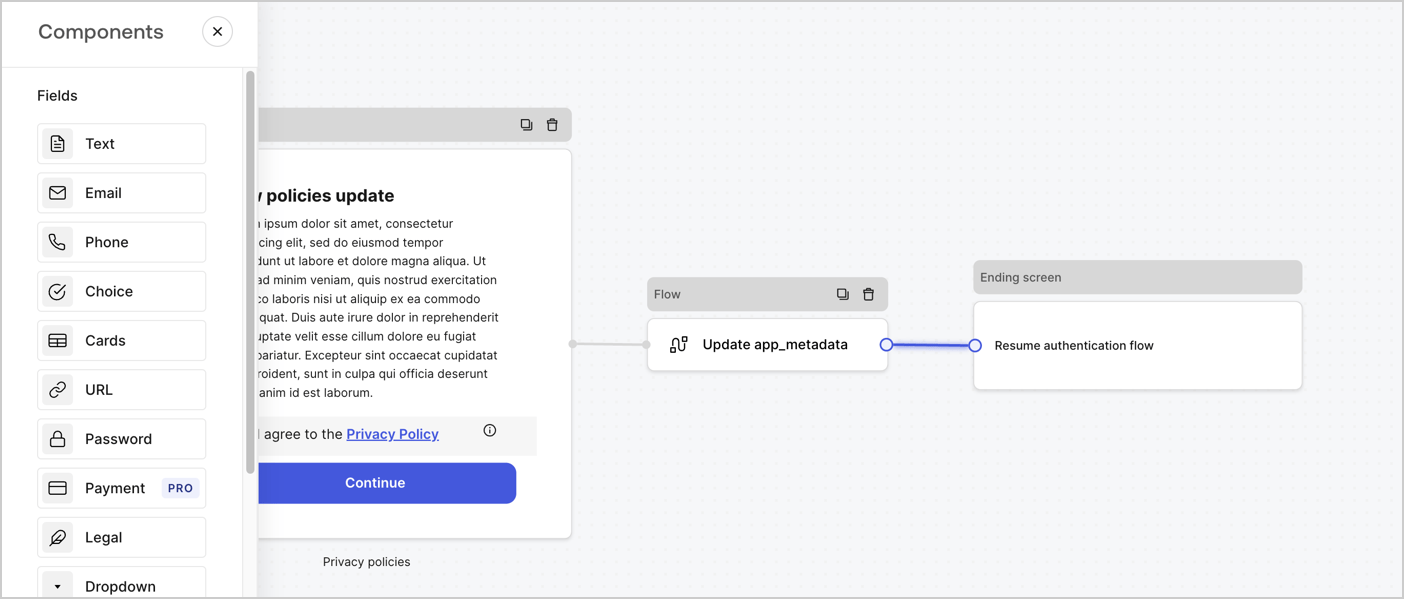
次の手順に従って、 **Step（ステップ）** ノードの後に **Flow（フロー）** ノードを追加し、`app_metadata`を更新して認証フローを再開します。

1. フォームエディターの下にある **［Flow（フロー）］** を選択します。
2. **Step（ステップ）** ノードと **Ending Screen（終了画面）** ノードの間にある既存のリンクを削除します。
3. 新たに **［Flow（フロー）］** > **［Click to add a flow（クリックしてフローを追加する）］** > **［Create a new flow（新しいフローを作成する）］** を選択します。

   * **［Name（名前）］** フィールドに`Update app_metadata`と入力します。
   * **［Create（作成）］** を選択します。
   * **［Save（保存）］** を選択します。
4. 下の画像のように **Flow（フロー）ノード** を **Step（ステップ）** ノードと **Ending Screen（終了画面）** ノードにリンクします。
5. **［Publish（公開）］** を選択して保存します。

<Frame>
  <img src="https://mintcdn.com/docs-staging-feat-docs-5607-tenant-acl/nLkK07PAzzdVw1Rz/docs/images/ja-jp/cdy7uua7fh8z/6YIkzm7SrpM9LW76AXuRzh/353c518fe82bbaa440836da1d83596d6/link-policies.png?fit=max&auto=format&n=nLkK07PAzzdVw1Rz&q=85&s=24650dcbb7abf2be48e2fa96d0a940e0" alt="Dashboard > Actions > Forms > Form" data-og-width="1404" width="1404" data-og-height="599" height="599" data-path="docs/images/ja-jp/cdy7uua7fh8z/6YIkzm7SrpM9LW76AXuRzh/353c518fe82bbaa440836da1d83596d6/link-policies.png" data-optimize="true" data-opv="3" srcset="https://mintcdn.com/docs-staging-feat-docs-5607-tenant-acl/nLkK07PAzzdVw1Rz/docs/images/ja-jp/cdy7uua7fh8z/6YIkzm7SrpM9LW76AXuRzh/353c518fe82bbaa440836da1d83596d6/link-policies.png?w=280&fit=max&auto=format&n=nLkK07PAzzdVw1Rz&q=85&s=49c6029d4a0b28bffaad91854e434f5d 280w, https://mintcdn.com/docs-staging-feat-docs-5607-tenant-acl/nLkK07PAzzdVw1Rz/docs/images/ja-jp/cdy7uua7fh8z/6YIkzm7SrpM9LW76AXuRzh/353c518fe82bbaa440836da1d83596d6/link-policies.png?w=560&fit=max&auto=format&n=nLkK07PAzzdVw1Rz&q=85&s=80b92cd17cfe944a3404705019e152cd 560w, https://mintcdn.com/docs-staging-feat-docs-5607-tenant-acl/nLkK07PAzzdVw1Rz/docs/images/ja-jp/cdy7uua7fh8z/6YIkzm7SrpM9LW76AXuRzh/353c518fe82bbaa440836da1d83596d6/link-policies.png?w=840&fit=max&auto=format&n=nLkK07PAzzdVw1Rz&q=85&s=463d569b26d50c24a63143c148b0eef7 840w, https://mintcdn.com/docs-staging-feat-docs-5607-tenant-acl/nLkK07PAzzdVw1Rz/docs/images/ja-jp/cdy7uua7fh8z/6YIkzm7SrpM9LW76AXuRzh/353c518fe82bbaa440836da1d83596d6/link-policies.png?w=1100&fit=max&auto=format&n=nLkK07PAzzdVw1Rz&q=85&s=8c385f5072a384070a7580e42fdf79fe 1100w, https://mintcdn.com/docs-staging-feat-docs-5607-tenant-acl/nLkK07PAzzdVw1Rz/docs/images/ja-jp/cdy7uua7fh8z/6YIkzm7SrpM9LW76AXuRzh/353c518fe82bbaa440836da1d83596d6/link-policies.png?w=1650&fit=max&auto=format&n=nLkK07PAzzdVw1Rz&q=85&s=0adba735f0f6d44bfe96d9e60a506ed1 1650w, https://mintcdn.com/docs-staging-feat-docs-5607-tenant-acl/nLkK07PAzzdVw1Rz/docs/images/ja-jp/cdy7uua7fh8z/6YIkzm7SrpM9LW76AXuRzh/353c518fe82bbaa440836da1d83596d6/link-policies.png?w=2500&fit=max&auto=format&n=nLkK07PAzzdVw1Rz&q=85&s=17b64e416d58ea32f76ebbbf5181e3c2 2500w" />
</Frame>

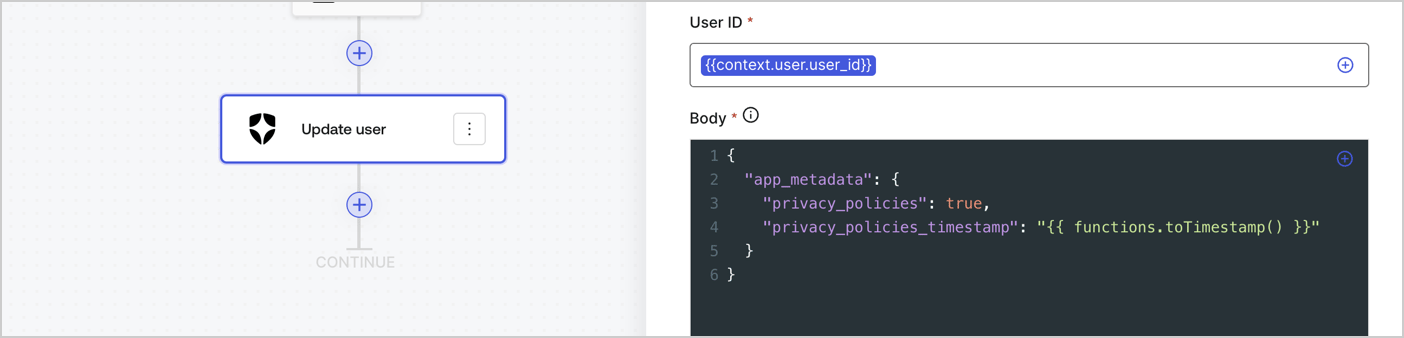
Auth0ユーザーの更新アクションをフローに追加するには、次の手順に従います。

1. **［Update user\_metadata（user\_metadata更新）］* \*\*\* フロー*\* を選択してから **［Edit flow（フローの編集）］** を選択し、新しいタブにフローエディターを開きます。
2. アクションの **［Start（開始）］** の下にある **［+］** アイコンを選択し、 **Update user（ユーザー更新）** アクションを追加します。以下のフィールドに入力して、 **［Save（保存）］** を選択します。

   * **Connection（接続）** ：ドロップダウンからM2MアプリケーションへのVault接続を選択します。

   * **User ID（ユーザーID）** ：`{{context.user.user_id}}`と入力します。

   * **Body（ボディー）** ：以下のコードをコピーして貼り付け、privacy\_policiesとprivacy\_policies\_timestampのプロパティを含むapp\_metadataを更新します。

     ```text lines theme={null}
     {
       "app_metadata": {
         "privacy_policies": true,
         "privacy_policies_timestamp": "{{ functions.toTimestamp() }}"
       }
     }
     ```

   * **［Save（保存）］** を選択します。
3. **［Publish（公開）］** を選択して保存します。

<Frame>
  <img src="https://mintcdn.com/docs-staging-feat-docs-5607-tenant-acl/x7xY5ZwcZes_7FCp/docs/images/ja-jp/cdy7uua7fh8z/CvMNIwWrOUwaFW4X3G28p/1fb70ae57a20749d9ffaaba8dc0b7e26/update-user-privacy.png?fit=max&auto=format&n=x7xY5ZwcZes_7FCp&q=85&s=2f576fb74891cd8da00d0a5563a8bcd3" alt="Dashboard > Actions > Forms > User case privacy policy code" data-og-width="1404" width="1404" data-og-height="338" height="338" data-path="docs/images/ja-jp/cdy7uua7fh8z/CvMNIwWrOUwaFW4X3G28p/1fb70ae57a20749d9ffaaba8dc0b7e26/update-user-privacy.png" data-optimize="true" data-opv="3" srcset="https://mintcdn.com/docs-staging-feat-docs-5607-tenant-acl/x7xY5ZwcZes_7FCp/docs/images/ja-jp/cdy7uua7fh8z/CvMNIwWrOUwaFW4X3G28p/1fb70ae57a20749d9ffaaba8dc0b7e26/update-user-privacy.png?w=280&fit=max&auto=format&n=x7xY5ZwcZes_7FCp&q=85&s=1cc80328f69a68ebf4784543b236bf18 280w, https://mintcdn.com/docs-staging-feat-docs-5607-tenant-acl/x7xY5ZwcZes_7FCp/docs/images/ja-jp/cdy7uua7fh8z/CvMNIwWrOUwaFW4X3G28p/1fb70ae57a20749d9ffaaba8dc0b7e26/update-user-privacy.png?w=560&fit=max&auto=format&n=x7xY5ZwcZes_7FCp&q=85&s=b83f262dcf4fc09539e406c45750fd40 560w, https://mintcdn.com/docs-staging-feat-docs-5607-tenant-acl/x7xY5ZwcZes_7FCp/docs/images/ja-jp/cdy7uua7fh8z/CvMNIwWrOUwaFW4X3G28p/1fb70ae57a20749d9ffaaba8dc0b7e26/update-user-privacy.png?w=840&fit=max&auto=format&n=x7xY5ZwcZes_7FCp&q=85&s=41874907a73b0586fd820ed4f2062fa2 840w, https://mintcdn.com/docs-staging-feat-docs-5607-tenant-acl/x7xY5ZwcZes_7FCp/docs/images/ja-jp/cdy7uua7fh8z/CvMNIwWrOUwaFW4X3G28p/1fb70ae57a20749d9ffaaba8dc0b7e26/update-user-privacy.png?w=1100&fit=max&auto=format&n=x7xY5ZwcZes_7FCp&q=85&s=5f08c075212c6fc60c0ec2ab2b859a28 1100w, https://mintcdn.com/docs-staging-feat-docs-5607-tenant-acl/x7xY5ZwcZes_7FCp/docs/images/ja-jp/cdy7uua7fh8z/CvMNIwWrOUwaFW4X3G28p/1fb70ae57a20749d9ffaaba8dc0b7e26/update-user-privacy.png?w=1650&fit=max&auto=format&n=x7xY5ZwcZes_7FCp&q=85&s=141cdcc758e4c9a6fcb87f805fde88a5 1650w, https://mintcdn.com/docs-staging-feat-docs-5607-tenant-acl/x7xY5ZwcZes_7FCp/docs/images/ja-jp/cdy7uua7fh8z/CvMNIwWrOUwaFW4X3G28p/1fb70ae57a20749d9ffaaba8dc0b7e26/update-user-privacy.png?w=2500&fit=max&auto=format&n=x7xY5ZwcZes_7FCp&q=85&s=68360724db958c4f5be3eb4979eb3436 2500w" />
</Frame>

<Callout icon="file-lines" color="#0EA5E9" iconType="regular">
  **Update app\_metadata** フローは、`privacy_policies true`値を`app_metadata`オブジェクトに追加し、[ヘルパー関数](/docs/ja-jp/customize/forms/variables)を使ってタイムスタンプを生成します。
</Callout>

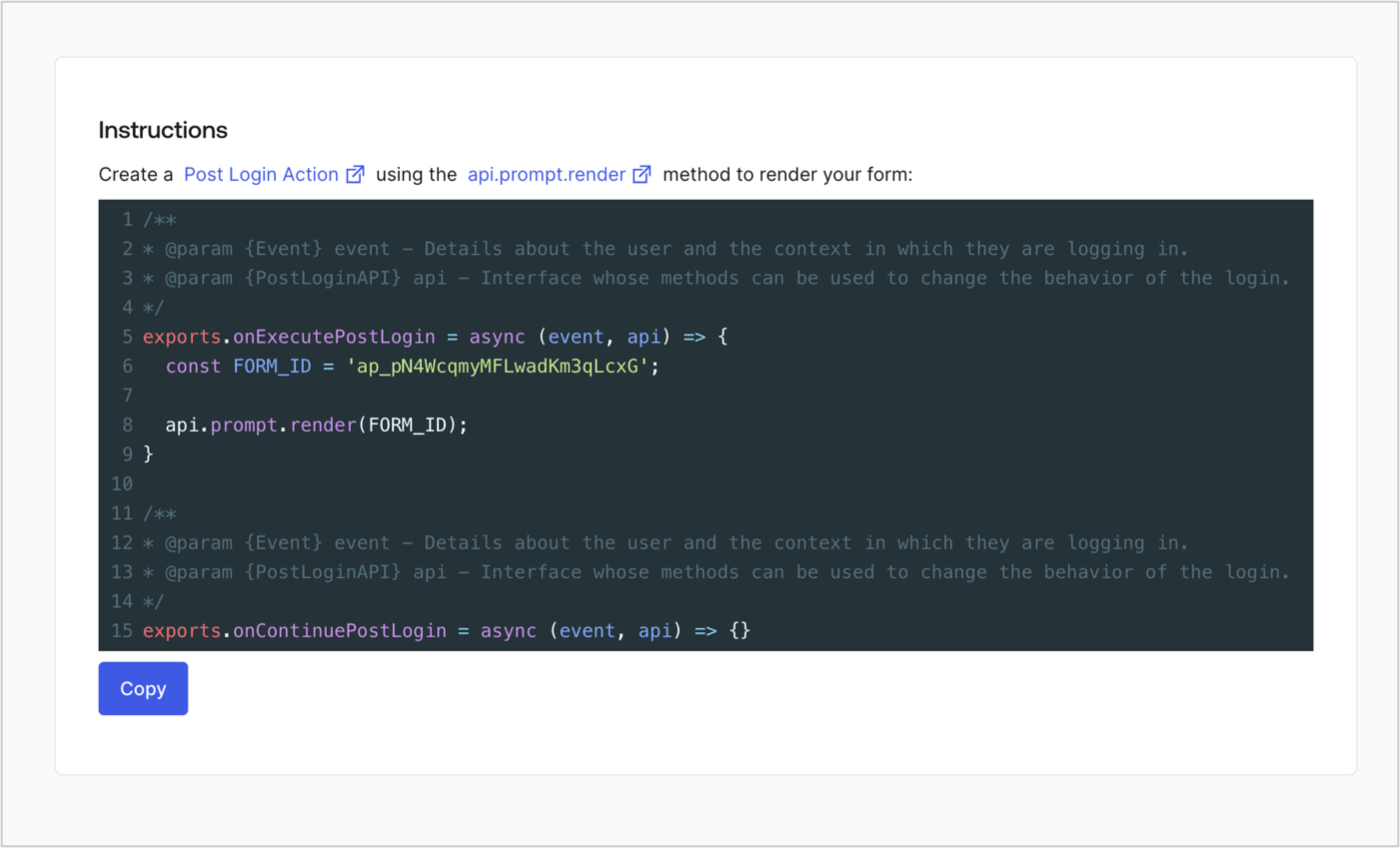
## フォームのレンダーコードを取得する

フォームのレンダーコードを取得して、カスタムのログイン後アクションでフォームを視覚的にレンダリングするには、以下の手順に従います。

* フォームエディターから **`<>`［Render（レンダー）］** を選択します。
* **［Copy（コピー）］** を選択します。

<Frame>
  <img src="https://mintcdn.com/docs-staging-feat-docs-5607-tenant-acl/glS1lqc0x1e43a1J/docs/images/ja-jp/cdy7uua7fh8z/2EIUzc539sq9lwoTKbjoJv/496a864c0fc44a782c9cadca119dbfb0/embed.png?fit=max&auto=format&n=glS1lqc0x1e43a1J&q=85&s=6b02ac73d8660480f456a6b4fe97d9d1" alt="Dashboard > Actions > Forms > Form > Embed" data-og-width="1400" width="1400" data-og-height="848" height="848" data-path="docs/images/ja-jp/cdy7uua7fh8z/2EIUzc539sq9lwoTKbjoJv/496a864c0fc44a782c9cadca119dbfb0/embed.png" data-optimize="true" data-opv="3" srcset="https://mintcdn.com/docs-staging-feat-docs-5607-tenant-acl/glS1lqc0x1e43a1J/docs/images/ja-jp/cdy7uua7fh8z/2EIUzc539sq9lwoTKbjoJv/496a864c0fc44a782c9cadca119dbfb0/embed.png?w=280&fit=max&auto=format&n=glS1lqc0x1e43a1J&q=85&s=05575a5a4c96806a61664b6db397eee9 280w, https://mintcdn.com/docs-staging-feat-docs-5607-tenant-acl/glS1lqc0x1e43a1J/docs/images/ja-jp/cdy7uua7fh8z/2EIUzc539sq9lwoTKbjoJv/496a864c0fc44a782c9cadca119dbfb0/embed.png?w=560&fit=max&auto=format&n=glS1lqc0x1e43a1J&q=85&s=205d616e7bcc1c12d2343a22bc41f547 560w, https://mintcdn.com/docs-staging-feat-docs-5607-tenant-acl/glS1lqc0x1e43a1J/docs/images/ja-jp/cdy7uua7fh8z/2EIUzc539sq9lwoTKbjoJv/496a864c0fc44a782c9cadca119dbfb0/embed.png?w=840&fit=max&auto=format&n=glS1lqc0x1e43a1J&q=85&s=e70a7d792fa876286f6ba2c514373680 840w, https://mintcdn.com/docs-staging-feat-docs-5607-tenant-acl/glS1lqc0x1e43a1J/docs/images/ja-jp/cdy7uua7fh8z/2EIUzc539sq9lwoTKbjoJv/496a864c0fc44a782c9cadca119dbfb0/embed.png?w=1100&fit=max&auto=format&n=glS1lqc0x1e43a1J&q=85&s=648343c3cb201a058bbcf6e5a1190547 1100w, https://mintcdn.com/docs-staging-feat-docs-5607-tenant-acl/glS1lqc0x1e43a1J/docs/images/ja-jp/cdy7uua7fh8z/2EIUzc539sq9lwoTKbjoJv/496a864c0fc44a782c9cadca119dbfb0/embed.png?w=1650&fit=max&auto=format&n=glS1lqc0x1e43a1J&q=85&s=6cbe21cb67eafee12d62a6a72615a2cb 1650w, https://mintcdn.com/docs-staging-feat-docs-5607-tenant-acl/glS1lqc0x1e43a1J/docs/images/ja-jp/cdy7uua7fh8z/2EIUzc539sq9lwoTKbjoJv/496a864c0fc44a782c9cadca119dbfb0/embed.png?w=2500&fit=max&auto=format&n=glS1lqc0x1e43a1J&q=85&s=02ebd14b5b34c215ab35b0fd7db8ffdb 2500w" />
</Frame>

## ログイン後のアクションを作成する

ログイン後のアクションを作成してフォームをレンダリングするには、次の手順に従います。

1. **［Auth0 Dashboard］>［Actions（アクション）］>［Flows（フロー）］>［Login（ログイン）］** に移動します。
2. **［+］** アイコンを選択し、 **［Build from scratch（初めから構築する）］** を選択します。

   * **Name（名前）** ：`Render Update Policy Form`（更新ポリシーフォームのレンダリング）と入力します。
   * **Trigger（トリガー）** ：［`Login / Post Login`（ログイン/ログイン後）］を選択します。
   * **Runtime（ランタイム）** ：推奨バージョンを選択します。
3. **［Create（作成）］** を選択します。

ログイン後のアクションを構成するには、以下を行います。

1. 既存のコードをコードエディターから削除します。

2. フォームのレンダリングコードをコードエディターに貼り付けます。

3. コードを編集して、フォームをレンダリングする条件ロジックを定義します。

   ```javascript lines theme={null}
   /**
   * @param {Event} event - Details about the user and the context in which they are logging in.
   * @param {PostLoginAPI} api - Interface whose methods can be used to change the behavior of the login.
   */
   exports.onExecutePostLogin = async (event, api) => {
     const FORM_ID = 'REPLACE_WITH_YOUR_FORM_ID';

     if (event.user.app_metadata.privacy_policies !== true) {
       api.prompt.render(FORM_ID);
     }
   }

   exports.onContinuePostLogin = async (event, api) => { }
   ```

   <Callout icon="file-lines" color="#0EA5E9" iconType="regular">
     上の例にあるコードでは、ユーザーのアプリメタデータに`privacy_policies`プロパティがない場合にフォームが表示されます。
   </Callout>

4. **［Deploy（デプロイ）］** を選択します。

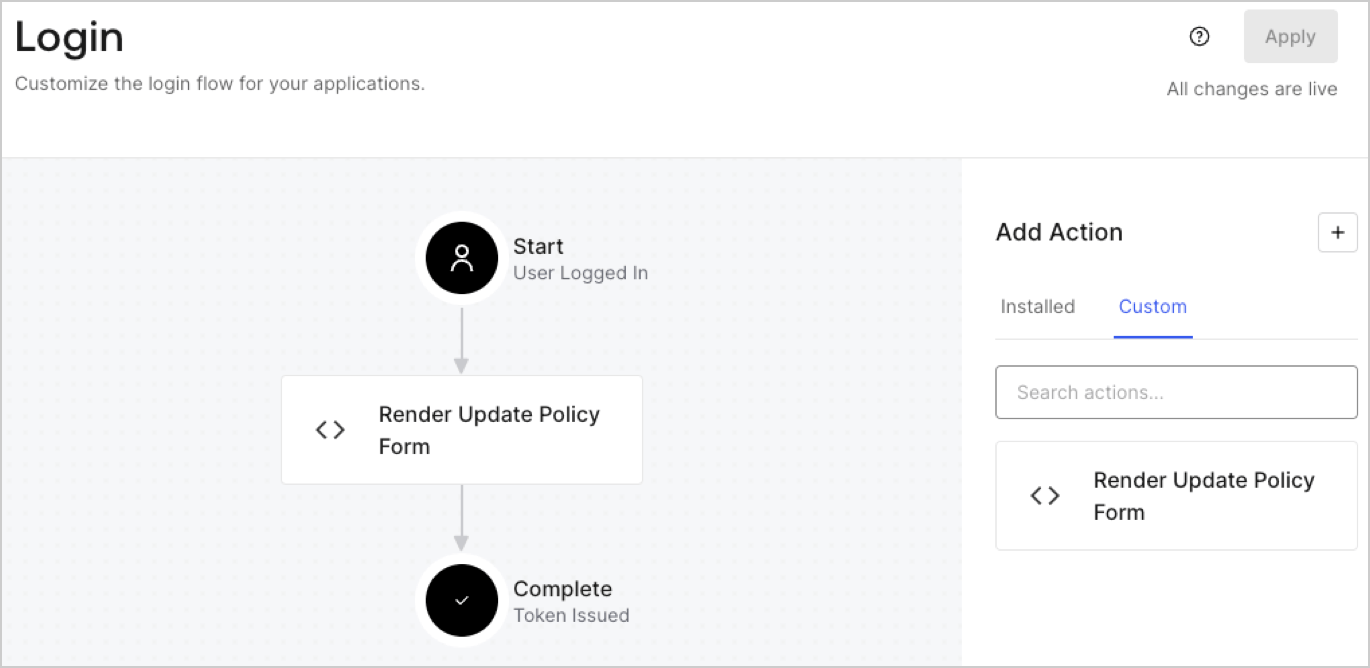
5. **［Render Update Policy Form（更新ポリシーフォームのレンダリング）］** アクションを **Login（ログイン）** フローにドラッグ＆ドロップします。

   <Frame>
     <img src="https://mintcdn.com/docs-staging-feat-docs-5607-tenant-acl/S5aXcVJ95rgV5fg5/docs/images/ja-jp/cdy7uua7fh8z/5TOwDgevZsBqd7yZynUYWU/41ca909dc3007aed4f40ff794a05efa5/postlogin.png?fit=max&auto=format&n=S5aXcVJ95rgV5fg5&q=85&s=b249255ab88ae27146234653e9397642" alt="Dashboard > Forms > Use Case > Render update policy form login action" data-og-width="1370" width="1370" data-og-height="668" height="668" data-path="docs/images/ja-jp/cdy7uua7fh8z/5TOwDgevZsBqd7yZynUYWU/41ca909dc3007aed4f40ff794a05efa5/postlogin.png" data-optimize="true" data-opv="3" srcset="https://mintcdn.com/docs-staging-feat-docs-5607-tenant-acl/S5aXcVJ95rgV5fg5/docs/images/ja-jp/cdy7uua7fh8z/5TOwDgevZsBqd7yZynUYWU/41ca909dc3007aed4f40ff794a05efa5/postlogin.png?w=280&fit=max&auto=format&n=S5aXcVJ95rgV5fg5&q=85&s=8a8df256e7b94e6288862fb44c203d54 280w, https://mintcdn.com/docs-staging-feat-docs-5607-tenant-acl/S5aXcVJ95rgV5fg5/docs/images/ja-jp/cdy7uua7fh8z/5TOwDgevZsBqd7yZynUYWU/41ca909dc3007aed4f40ff794a05efa5/postlogin.png?w=560&fit=max&auto=format&n=S5aXcVJ95rgV5fg5&q=85&s=8eea0d9032ab6507a76088ba3c76993d 560w, https://mintcdn.com/docs-staging-feat-docs-5607-tenant-acl/S5aXcVJ95rgV5fg5/docs/images/ja-jp/cdy7uua7fh8z/5TOwDgevZsBqd7yZynUYWU/41ca909dc3007aed4f40ff794a05efa5/postlogin.png?w=840&fit=max&auto=format&n=S5aXcVJ95rgV5fg5&q=85&s=42fdefa1da0e15994e425d711f3c2fad 840w, https://mintcdn.com/docs-staging-feat-docs-5607-tenant-acl/S5aXcVJ95rgV5fg5/docs/images/ja-jp/cdy7uua7fh8z/5TOwDgevZsBqd7yZynUYWU/41ca909dc3007aed4f40ff794a05efa5/postlogin.png?w=1100&fit=max&auto=format&n=S5aXcVJ95rgV5fg5&q=85&s=c0f4c537c5ec0a21446b0725d560039f 1100w, https://mintcdn.com/docs-staging-feat-docs-5607-tenant-acl/S5aXcVJ95rgV5fg5/docs/images/ja-jp/cdy7uua7fh8z/5TOwDgevZsBqd7yZynUYWU/41ca909dc3007aed4f40ff794a05efa5/postlogin.png?w=1650&fit=max&auto=format&n=S5aXcVJ95rgV5fg5&q=85&s=da02f62c00e73b2700c98abeb7c5a3ca 1650w, https://mintcdn.com/docs-staging-feat-docs-5607-tenant-acl/S5aXcVJ95rgV5fg5/docs/images/ja-jp/cdy7uua7fh8z/5TOwDgevZsBqd7yZynUYWU/41ca909dc3007aed4f40ff794a05efa5/postlogin.png?w=2500&fit=max&auto=format&n=S5aXcVJ95rgV5fg5&q=85&s=977723d7b164ae40a6bde8abdf61d71a 2500w" />
   </Frame>

6. **［Apply（適用）］** を選択します。

### 実装をテストする

次の手順に従って実装をテストします。

1. `app_metadata`属性の`privacy_policies`に値がない既存のユーザーとしてログインします。
2. ログインフローのログイン後アクションがフォームをレンダリングして、同意を求めます。
3. **［Auth0 Dashboard］>［User Management（ユーザー管理）］>［Users（ユーザー）］** に移動し、ユーザーを見つけて、`app_metadata`属性の`privacy_policies`に`true`値とタイムスタンプが含まれていることを確認します。